Use Storage Access Framework in Android
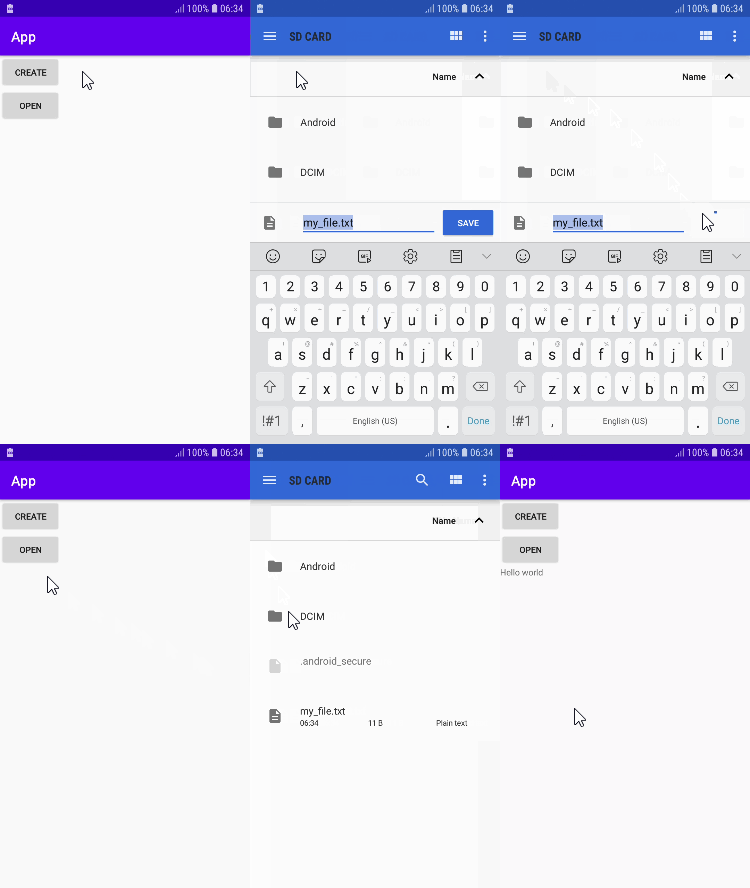
The Storage Access Framework (SAF) provides a file picker that allows to browse, create, and open files hosted by storage services (document providers). It can be external storage, cloud-based storage, etc.
SAF doesn't require defining permissions in the manifest file because the user selects the files or directories that application can access. Files won't be removed when the user uninstalls the application.
In the layout XML file, we added two Button elements. One of these will be used to create a file,
app/src/main/res/layout/activity_main.xml
1234567891011121314151617181920212223242526<?xml version="1.0" encoding="utf-8"?>
<LinearLayout xmlns:android="http://schemas.android.com/apk/res/android"
    xmlns:tools="http://schemas.android.com/tools"
    android:layout_width="match_parent"
    android:layout_height="match_parent"
    android:orientation="vertical"
    tools:context=".MainActivity">

    <Button
        android:id="@+id/createButton"
        android:layout_width="wrap_content"
        android:layout_height="wrap_content"
        android:text="Create" />

    <Button
        android:id="@+id/openButton"
        android:layout_width="wrap_content"
        android:layout_height="wrap_content"
        android:text="Open" />

    <TextView
        android:id="@+id/myTextView"
        android:layout_width="wrap_content"
        android:layout_height="wrap_content" />

</LinearLayout>
We can open a file by using a file picker which was loaded by ACTION_OPEN_DOCUMENT intent action. We can specify a MIME type to show only specific file types.
When the user selected a file, an intent returns control to the application by calling the onActivityResult() method. The first parameter is the request code that is used to identify the intent. The second parameter is the result code that indicates whether the intent was successful. The third parameter is result data that contains the selected file's URI.
By using the URI of the selected file, we can write data to the file or read data from it.
app/src/main/java/com/example/app/MainActivity.kt
1234567891011121314151617181920212223242526272829303132333435363738394041424344454647484950515253545556575859606162636465666768697071727374757677package com.example.camera3;

import androidx.appcompat.app.AppCompatActivity;

import android.net.Uri;
import android.os.Bundle;
import android.provider.MediaStore;
import android.widget.Toast;
import android.content.Intent;
import android.os.Bundle;
import android.view.View;
import android.widget.Button;
import android.widget.TextView;
import java.io.FileInputStream;
import java.io.FileNotFoundException;
import java.io.FileOutputStream;
import java.io.IOException;
import java.io.InputStream;
import java.io.OutputStream;

public class MainActivity10 extends AppCompatActivity {
    private String fileName = "my_file";
    private int createRequestCode = 1;
    private int openRequestCode = 2;
    private Button createButton;
    private Button openButton;
    private TextView myTextView;
    private int saveRequestCode = 3;
    private Uri sourceUri;
    private Uri targetUri;

    @Override
    protected void onCreate(Bundle savedInstanceState) {
        super.onCreate(savedInstanceState);
        setContentView(R.layout.activity_main10);
        createButton = findViewById(R.id.createButton);
        openButton = findViewById(R.id.openButton);
        myTextView = findViewById(R.id.myTextView);

        createButton.setOnClickListener(new View.OnClickListener() {
            @Override
            public void onClick(View v) {
                createFile();
            }
        });

        openButton.setOnClickListener(new View.OnClickListener() {
            @Override
            public void onClick(View v) {
                openFile();
            }
        });


    }

    @Override
    public void onActivityResult(int requestCode, int resultCode, Intent resultData) {
        super.onActivityResult(requestCode, resultCode, resultData);

        if (requestCode == openRequestCode && resultCode == RESULT_OK) {
            sourceUri = resultData.getData();
            Toast.makeText(this, "see", Toast.LENGTH_SHORT).show();
        } else if (requestCode == saveRequestCode && resultCode == RESULT_OK) {
            targetUri = resultData.getData();
            copyFile(sourceUri, targetUri);
        }

        //only 3 select
//        if (requestCode == openRequestCode && resultCode == RESULT_OK && resultData != null) {
//            int count = resultData.getClipData().getItemCount();
//            if (count == 3) {
//                // The user has selected three images
//                Toast.makeText(this, "select 3 ok", Toast.LENGTH_SHORT).show();
//                // TODO: Handle the selected images here
//            } else {
//                // The user has selected an incorrect number of images
//                Toast.makeText(this, "not select 3 ", Toast.LENGTH_SHORT).show();
//                // TODO: Display an error message to the user
//            }
//        }

            // Use ContentResolver to open input stream from URI
//            InputStream inputStream = null;
//            try {
//                inputStream = getContentResolver().openInputStream(fileUri);
//                // Process input stream as needed
//            } catch (FileNotFoundException e) {
//                e.printStackTrace();
//            } finally {
//                if (inputStream != null) {
//                    try {
//                        inputStream.close();
//                    } catch (IOException e) {
//                        e.printStackTrace();
//                    }
//                }
//            }
        }


//        if (resultCode == Activity.RESULT_OK && resultData != null) {
//            if (requestCode == createRequestCode) {
//                write("Hello world", resultData.getData());
//            } else if (requestCode == openRequestCode) {
//                myTextView.setText(read(resultData.getData()));
//            }
//        }


    private void createFile() {
        if (sourceUri  == null) {
            Toast.makeText(this, "No file selected", Toast.LENGTH_SHORT).show();
            return;
        }
//

        Intent intent = new Intent(Intent.ACTION_CREATE_DOCUMENT);
        intent.addCategory(Intent.CATEGORY_OPENABLE);
        intent.setType("application/vnd.openxmlformats-officedocument.spreadsheetml.sheet");
        intent.putExtra(Intent.EXTRA_TITLE, "new_file.xlsx");

        startActivityForResult(intent, saveRequestCode);

//        Intent intent = new Intent(Intent.ACTION_CREATE_DOCUMENT);
//        intent.addCategory(Intent.CATEGORY_OPENABLE);
//        intent.setType("text/plain");
//        intent.putExtra(Intent.EXTRA_TITLE, fileName);
//
//        startActivityForResult(intent, createRequestCode);
    }

    private void openFile() {
        //xlsx file select
        Intent intent = new Intent(Intent.ACTION_GET_CONTENT);
        intent.setType("application/vnd.openxmlformats-officedocument.spreadsheetml.sheet");
        startActivityForResult(intent, openRequestCode);

        //only three select code
//        Intent intent = new Intent(Intent.ACTION_GET_CONTENT);
//        intent.setType("image/*");
//        intent.putExtra(Intent.EXTRA_ALLOW_MULTIPLE, true);
//        startActivityForResult(Intent.createChooser(intent, "Select Picture"), openRequestCode);


        //select all file
//        Intent intent = new Intent(Intent.ACTION_GET_CONTENT,
//                MediaStore.Images.Media.EXTERNAL_CONTENT_URI);
//        startActivityForResult(intent, openRequestCode);

//image select
//        Intent intent = new Intent(Intent.ACTION_GET_CONTENT);
//        intent.setType("image/*");
//        startActivityForResult(intent, openRequestCode);

        // video select
//        Intent intent = new Intent(Intent.ACTION_GET_CONTENT);
//        intent.setType("video/*");
//        startActivityForResult(intent, openRequestCode);

        //hight level xlsx file select
//        Intent intent = new Intent(Intent.ACTION_GET_CONTENT);
//        intent.setType("*/*");
//        String[] mimeTypes = {"application/xml", "application/vnd.ms-excel", "application/vnd.openxmlformats-officedocument.spreadsheetml.sheet"};
//        intent.putExtra(Intent.EXTRA_MIME_TYPES, mimeTypes);
//        startActivityForResult(Intent.createChooser(intent, "Select a file"), openRequestCode);

        //text file select
//        Intent intent = new Intent(Intent.ACTION_OPEN_DOCUMENT);
//        intent.addCategory(Intent.CATEGORY_OPENABLE);
//        intent.setType("text/plain");
//
//        startActivityForResult(intent, openRequestCode);
    }

    private void write(String message, Uri uri) {
        try {
            FileOutputStream fileOut = (FileOutputStream) getContentResolver().openOutputStream(uri);
            fileOut.write(message.getBytes());
            fileOut.close();
        } catch (IOException e) {
            e.printStackTrace();
        }
    }

    private String read(Uri uri) {
        String message = null;

        try {
            FileInputStream fileIn = (FileInputStream) getContentResolver().openInputStream(uri);
            byte[] buffer = new byte[fileIn.available()];
            fileIn.read(buffer);
            message = new String(buffer);
            fileIn.close();
        } catch (IOException e) {
            e.printStackTrace();
        }

        return message;
    }

    private void copyFile(Uri sourceUri, Uri targetUri) {
        try {
            InputStream inputStream = getContentResolver().openInputStream(sourceUri);
            OutputStream outputStream = getContentResolver().openOutputStream(targetUri);

            byte[] buffer = new byte[1024];
            int bytesRead;
            while ((bytesRead = inputStream.read(buffer)) != -1) {
                outputStream.write(buffer, 0, bytesRead);
            }

            inputStream.close();
            outputStream.flush();
            outputStream.close();

            Toast.makeText(this, "File copied successfully", Toast.LENGTH_SHORT).show();
        } catch (IOException e) {
            e.printStackTrace();
            Toast.makeText(this, "Error copying file", Toast.LENGTH_SHORT).show();
        }
    }
}

